Speech Recognition With Python
Comparing 9 most prominent alternatives
Speech recognition technologies have been evolving rapidly for the last couple of years, and are transitioning from the realm of science to engineering. With the growing popularity of voice assistants like Alexa, Siri, and Google Assistant, several apps are beginning to have functionalities controlled by voice.
Automatic Speech Recognition (ASR) is the necessary first step in processing voice. In ASR, an audio file or speech spoken to a microphone is processed and converted to text, therefore it is also known as Speech-to-Text (STT). Then this text is fed to a Natural Language Processing/Understanding (NLP/NLU) to understand and extract key information (such as intentions, sentiments), and then appropriate action is taken. There are also stand-alone applications of ASR, e.g. transcribing dictation, or producing real-time subtitles for videos.
This article is the result of exploring existing speech recognition SaaS and ready-to-use ASR models.
Service vs. Software
There are two possibilities: make calls to Speech-to-Text SaaS on the cloud or host one of the ASR software packages in your application.
Service is the easiest way to start. You have to sigh-up for a SaaS and get key/credentials. Then you are all set to use it in your code, either through HTTP endpoints or libraries in the programming languages of your choice. However, for reasonably large usage, it typically costs more money.
Software packages offer you full control as you are hosting it, and also the possibility of creating smaller models tailored for your application, and deploying it on-device/edge without needing network connectivity. But it requires expertise and upfront efforts to train and deploy the models.
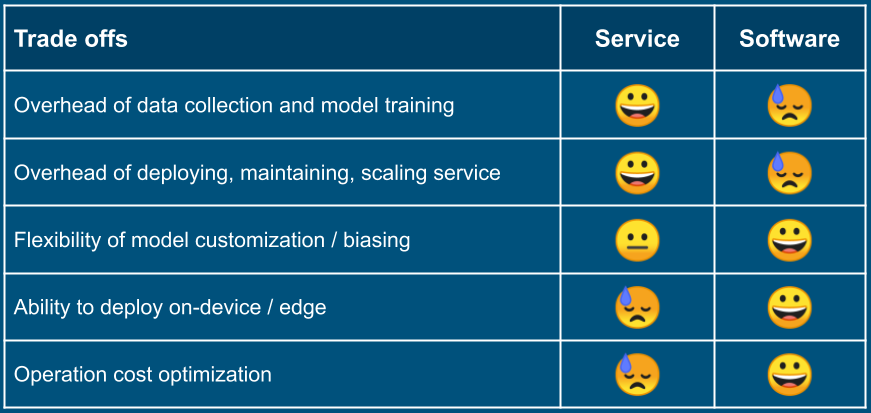
It is a reversible choice. For example, you can start with a cloud service, and if needed, move to your own deployment of a software package; and vice versa. You can design your code to limit the blast radius of such reversal, as well as in case if you migrate to another SaaS or software package.
Batch vs. Streaming
You need to determine whether your application requires batch ASR or streaming ASR.
Batch: If you have audio recordings that need to transcribe it offline, then batch processing will suffice as well more economical. In batch API, an audio file is passed as a parameter, and speech-to-text transcribing is done in one shot.
Streaming: If you need to process speech in real-time (e.g. in voice-controlled applications, video subtitles), you will need a streaming API. In the case of streaming API, it is repeatedly invoked with available chunks of the audio buffer. It may send interim results, but the final result is available at the end.
All services and software packages have batch APIs, but some lack streaming APIs at the moment. So if you have a streaming application, that eliminates some of the choices.
Choice of Python
Most speech services provide libraries in popular programming languages. In the worst case, you can always use HTTP endpoints. The same is true for speech packages, these come with bindings in various programming languages. In the worst case, you can create bindings yourself. So there is no constraint of using Python.
I am choosing Python for this article because most speech cloud services and ASR software packages have Python libraries.
You can run code snippets of the article using its companion Google Colab notebook in the browser, without requiring anything to be installed on your computer.
One common use case is to collect audio from the microphone and pass on the buffer (batch or streaming) to the speech recognition API. Invariably, in such transcribers, the microphone is accessed through PyAudio, which is implemented over PortAudio. But since the microphone is not accessible on Colab, we simplify it. We will use a complete audio file to examine batch API. And for streaming API, we will break an audio file into chunks and simulate stream.
How to best use the rest of the article
Following services and software packages are covered.
Services:
- Google Speech-to-Text
- Microsoft Azure Speech
- IBM Watson Speech to Test
- Amazon Transcribe
- Nuance
Software:
- CMU Sphinx
- Mozilla DeepSpeech
- Kaldi
- Facebook wav2letter
Code samples are not provided for Amazon Transcribe, Nuance, Kaldi, and Facebook wav2letter due to some peculiarity or limitation (listed in their respective sections). Instead, links to code samples and resources are given.
The next section has the common utility functions and test cases. The last section covers the Python SpeechRecognition package that provides an abstraction over batch API of several could services and software packages.
If you want to have an overview of all services and software packages, then please open the Google Colab, and execute the code as you read this post. If you are interested only in a specific service or package, directly jump to that section. But in either case, do play with the code in Colab to explore it better.
Let’s plunge into the code.
Common Setup
Download the audio files we will use for testing Speech Recognition services and software packages:
$ curl -LO https://github.com/mozilla/DeepSpeech/releases/download/v0.6.0/audio-0.6.0.tar.gz

$ tar -xvzf audio-0.6.0.tar.gz

$ ls -l ./audio/
It has three audio files. Define test cases with needed metadata:
| |
Also, write some utility functions. The read_wav_file() takes the path to the audio file, and returns the buffer bytes and sample rate:
| |
The simulate_stream() is useful for simulating steam to try streaming APIs. Usually, there will be an audio source like a microphone. At regular intervals, the microphone will generate a speech chunk, which has to be passed to the streaming API. The simulate_stream() function helps to avoid all that complexity and to focus on the APIs. It takes an audio buffer and batch size, and generates chunks of that size. Notice the yield buf statement in the following:
| |
Google Speech-to-Text
Google has speech-to-text as one of the Google Cloud services. It has libraries in C#, Go, Java, JavaScript, PHP, Python, and Ruby. It supports both batch and stream modes.
Setup
You will need your Google Cloud Credentials. You will need to setup GOOGLE_APPLICATION_CREDENTIALS environment variable pointing to the cred file:
$ export GOOGLE_APPLICATION_CREDENTIALS='/path/to/google/cloud/cred/file/gc-creds.json'
$ ls -l $GOOGLE_APPLICATION_CREDENTIALS
Batch API
Using batch speech-to-text-API is straightforward. You need to create a SpeechClient, create a config with audio metadata and call recognize() method of the speech client.
| |
When you run this, you will see the text of each of the audio test files in the output:
audio file="audio/2830-3980-0043.wav"    expected text="experience proves this"
google-cloud-batch-stt: "experience proves this"

audio file="audio/4507-16021-0012.wav"    expected text="why should one halt on the way"
google-cloud-batch-stt: "why should one halt on the way"

audio file="audio/8455-210777-0068.wav"    expected text="your power is sufficient i said"
google-cloud-batch-stt: "your power is sufficient I said"
Streaming API
Google’s streaming API is also quite simple. For processing audio stream, you can repeatedly call the streaming API with the available chunk of audio, and it will return you interim results:
| |
In the output, you can see that the result improves as more audio is fed:
audio file="audio/2830-3980-0043.wav"    expected text="experience proves this"
interim results:
not final: next
not final: iSpy
not final: Aspira
not final: Xperia
not final: Experian
not final: experience
not final: experience proved
not final: experience proves
not final: experience proves the
not final: experience proves that
not final: experience
final: experience proves this
google-cloud-streaming-stt: "experience proves this"
Microsoft Azure Speech
Microsoft Azure Cognitive Services is a family of AI services and cognitive APIs. The Speech Services include Speech to Text, Text to Speech, Speech Translation services.
Setup
Install Azure speech package:
$ pip3 install azure-cognitiveservices-speech
You can enable Speech service and find credentials for your account at Microsoft Azure portal. You can open a free account here. Service credentials:
AZURE_SPEECH_KEY = 'YOUR AZURE SPEECH KEY'
AZURE_SERVICE_REGION = 'YOUR AZURE SERVICE REGION'
Batch API
Azure’s batch API is simple too. It takes a config and audio input, and returns the text:
| |
The output will be as following:
audio file="audio/2830-3980-0043.wav"    expected text="experience proves this"
azure-batch-stt: "Experience proves this."

audio file="audio/4507-16021-0012.wav"    expected text="why should one halt on the way"
azure-batch-stt: "Whi should one halt on the way."

audio file="audio/8455-210777-0068.wav"    expected text="your power is sufficient i said"
azure-batch-stt: "Your power is sufficient I said."
Streaming API
Azure has several kinds of streaming API. By creating different types of audio sources, one can either push the audio chunks, or pass a callback to Azure to pull the audio chunk. It fires several types of speech recognition events to hookup callbacks. Here is how you can wire a push audio stream with the audio stream generator:
| |
The output for the first test case looks like:
audio file="audio/2830-3980-0043.wav"    expected text="experience proves this"
interim text: "experience"
interim text: "experienced"
interim text: "experience"
interim text: "experience proves"
interim text: "experience proves this"
azure-streaming-stt: "Experience proves this."
IBM Watson Speech to Text
IBM Watson Speech to Text is an ASR service with .NET, Go, JavaScript, Python, Ruby, Swift, and Unity API libraries, as well as HTTP endpoints. It has rich documentation.
Setup
You will need to sign up/in, and get API key credential and service URL, and fill it below.
Batch API
The batch API is predictably simple:
| |
Here is the output:
audio file="audio/2830-3980-0043.wav"    expected text="experience proves this"
watson-batch-stt: "experience proves this "

audio file="audio/4507-16021-0012.wav"    expected text="why should one halt on the way"
watson-batch-stt: "why should one hold on the way "

audio file="audio/8455-210777-0068.wav"    expected text="your power is sufficient i said"
watson-batch-stt: "your power is sufficient I set "
Streaming API
Watson’s streaming API works over WebSocket, and takes a little bit of work to set it all up. It has the following steps:
- Create a RecognizeCallback object for receiving speech recognition notifications and results.
- Create a buffer queue. Audio chunks produced by the microphone (or stream simulator) should be written to this queue, and Watson reads and consumes the chunks.
- Start a thread in which speech recognition (along with WebSocket communication) executes.
- Start microphone or speech simulator, to start producing audio chunks
- Upon completion, join the speech recognition thread (i.e. wait till it completes).
| |
Output produced:
audio file="audio/2830-3980-0043.wav"    expected text="experience proves this"
not final: X.
not final: experts
not final: experience
not final: experienced
not final: experience prove
not final: experience proves
not final: experience proves that
not final: experience proves this
final: experience proves this
watson-cloud-streaming-stt: "experience proves this "
Amazon Transcribe
Amazon Transcribe is a speech-to-text AWS cloud service with libraries in C#, Go, Java, JavaScript, PHP, Python, and Ruby. It has a batch speech-to-text API (also available as command line), but it requires the audio file to be either in an S3 bucket, or be available over HTTP. It also has a streaming API on WebSocket and HTTP/2. Here is an example with AWS Java SDK, but no Python bindings (of course, a Python socket library can be used, but it will require getting into low-level event stream encoding).
Amazon Transcribe Python APIs currently do not facilitate use cases covered in this article, and therefore code samples are not included here.
Nuance

Nuance is most probably the oldest commercial speech recognition products, even customized for various domains and industries. They do have Python bindings for a speech recognition service. Here is a code sample in their GitHub repo.
I could not figure out a way to create a developer account. I hope there is a way to get a limited period of free trial credits similar to other products, and get the credentials needed to access the services.
CMU Sphinx

CMUSphinx has been around for quite some time, and has been adapting to advancements in ASR technologies. PocketSphinx is a speech-to-text decoder Python package.
Setup
First, install swig. On macOS, you can install using brew:
$ brew install swig
$ swig -version
On Linux, you can use apt-get:
$ apt-get install -y swig libpulse-dev
$ swig -version
And then install pocketsphinx using pip:
$ pip3 install pocketsphinx
$ pip3 list | grep pocketsphinx
Create a Decoder Object
Whether you use batch or streaming API, you will require a decoder object:
| |
Batch API
Batch API is expectedly simple, just a couple of lines of code:
| |
And you will see the now familiar output:
audio file="audio/2830-3980-0043.wav"    expected text="experience proves this"
sphinx-batch-stt: "experience proves this"

audio file="audio/4507-16021-0012.wav"    expected text="why should one halt on the way"
sphinx-batch-stt: "why should one hold on the way"

audio file="audio/8455-210777-0068.wav"    expected text="your power is sufficient i said"
sphinx-batch-stt: "your paris sufficient i said"
Notice the errors in transcription. With more training data, it typically improves.
Streaming API
Streaming APIs are also quite simple, but there is no hook to get intermediate results:
| |
Mozilla DeepSpeech
Mozilla released DeepSpeech 0.6 software package in December 2019 with APIs in C, Java, .NET, Python, and JavaScript, including support for TensorFlow Lite models for use on edge devices.
Setup
You can install DeepSpeech with pip (make it deepspeech-gpu==0.6.0 if you want to use GPU in Colab runtime or on your machine):
$ pip install deepspeech==0.6.0
Download and unzip the models (this will take a while):
$ curl -LO https://github.com/mozilla/DeepSpeech/releases/download/v0.6.0/deepspeech-0.6.0-models.tar.gz
$ tar -xvzf deepspeech-0.6.0-models.tar.gz
$ ls -l ./deepspeech-0.6.0-models/
Test that it all works. Examine the output of the last three commands, and you will see results “experience proof less”, “why should one halt on the way”, and “your power is sufficient i said” respectively. You are all set.
$ deepspeech --model deepspeech-0.6.0-models/output_graph.pb --lm deepspeech-0.6.0-models/lm.binary --trie ./deepspeech-0.6.0-models/trie --audio ./audio/2830-3980-0043.wav

$ deepspeech --model deepspeech-0.6.0-models/output_graph.pb --lm deepspeech-0.6.0-models/lm.binary --trie ./deepspeech-0.6.0-models/trie --audio ./audio/4507-16021-0012.wav

$ deepspeech --model deepspeech-0.6.0-models/output_graph.pb --lm deepspeech-0.6.0-models/lm.binary --trie ./deepspeech-0.6.0-models/trie --audio ./audio/8455-210777-0068.wav
Create a Model Object
The first step is to read the model files and create a DeepSpeech model object.
| |
Batch API
It takes just a couple of line of code for doing batch speech-to-text:
| |
Output:
audio file="audio/2830-3980-0043.wav"    expected text="experience proves this"
deepspeech-batch-stt: "experience proof less"

audio file="audio/4507-16021-0012.wav"    expected text="why should one halt on the way"
deepspeech-batch-stt: "why should one halt on the way"

audio file="audio/8455-210777-0068.wav"    expected text="your power is sufficient i said"
deepspeech-batch-stt: "your power is sufficient i said"
Streaming API
DeepSpeech streaming API requires creating a stream context and use it repeatedly to feed chunks of audio:
| |
DeepSpeech returns interim results:
audio file="audio/2830-3980-0043.wav"    expected text="experience proves this"
inetrim text: i
inetrim text: e
inetrim text: experi en
inetrim text: experience pro
inetrim text: experience proof les
deepspeech-streaming-stt: "experience proof less"
Kaldi

Kaldi is a very popular software toolkit for speech recognition among the research community. It is designed to experiment with different research ideas and possibilities. It has a rich collection of various possible techniques and alternatives. The learning curve is steeper compared to other alternatives discussed in the code lab.
PyKaldi provides Python bindings. Please do take a look at the README of their GitHub repo.
There is no pre-build PyPI ready-to-use package, and you have to build it either from source or from Conda. Neither options suit the Colab environment.
Facebook wav2letter

Facebook released wav2letter@anywhere in January 2020. It boasts a fully convolutional (CNN) acoustic model instead of a recurrent neural network (RNN) that is used by other solutions. It is very promising, include for use in edge devices. It has Python bindings for its inference framework.
Like Kaldi, this also does not provide a PyPI package, and needs to build and install from the source.
SpeechRecognition Python Package
The SpeechRecognition package provides a nice abstraction over several solutions. We already explored using Google service and CMU Sphinxpackage. Now we will use these through SpeechRecognition package APIs. It can be installed using pip:
Batch API
SpeechRecognition has only batch API. The first step to create an audio record, either from a file or from a microphone, and the second step is to call recognize_<speech engine name> function. It currently has APIs for CMU Sphinx, Google, Microsoft, IBM, Houndify, and Wit. Let’s checkout using one cloud service (Google) and one software package (Sphinx) through SpeechRecognition abstraction.
| |
Output:
audio file="audio/2830-3980-0043.wav"    expected text="experience proves this"
sphinx: "experience proves that"
google: "experience proves this"

audio file="audio/4507-16021-0012.wav"    expected text="why should one halt on the way"
sphinx: "why should one hold on the way"
google: "why should one halt on the way"

audio file="audio/8455-210777-0068.wav"    expected text="your power is sufficient i said"
sphinx: "your paris official said"
google: "your power is sufficient I said"
API for other providers
For other speech recognition providers, you will need to create API credentials, which you have to pass to recognize_<speech engine name> function, you can check out this example.
It also has a nice abstraction for Microphone, implemented over PyAudio/PortAudio. Check out examples to capture input from the microphone in batch and continuously in the background.